


How to Put a Roll in a Card Machine (Step by Step)
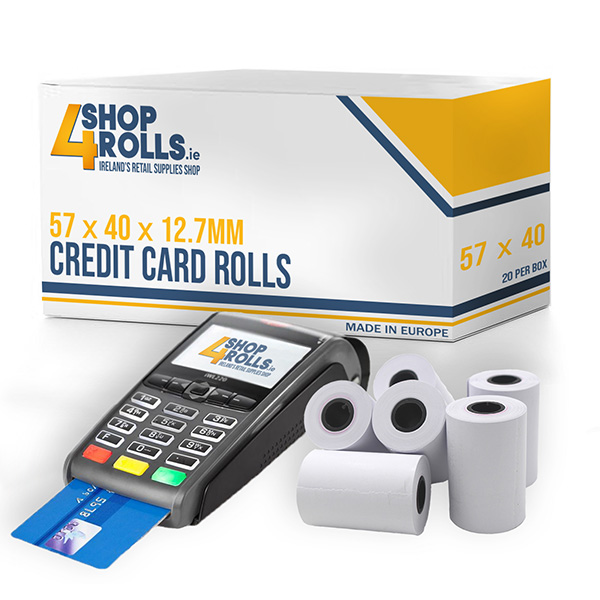
Loading a card machine roll takes only a few seconds. Open the printer flap on top of the terminal, lift out the empty core, drop the new roll in so the paper feeds from underneath and out towards the front, leave a short tail poking out, then press the flap shut until it clicks.
How do you open a card machine to change the roll?
The paper bay sits on the top or back of the terminal behind a hinged flap. Look for a small tab, ridge or arrow on the edge of the flap. Pull that tab up and back and the whole lid springs open in one movement. Nothing needs unscrewing and no tool is needed.
On countertop and handheld terminals the flap runs across the top, just behind the screen. On smaller mobile readers it can sit at the back or on one end. If the lid feels stiff, you are usually pulling the wrong edge. Find the tab, then lift straight up rather than prising sideways.
Take the old core out before you do anything else. A leftover cardboard core is one of the most common reasons a flap will not close properly afterwards.
Which way does the roll go in a card machine?
The paper feeds from underneath the roll and out towards the front of the terminal. Sit the roll in the bay so it unwinds from the bottom, with the loose end coming up over the front edge. If the paper comes off the top of the roll instead, it is in the wrong way round and will print blank.
The reason is the coating. Card machine rolls are thermal, so only one side reacts to the print head. Get the roll the wrong way up and the head presses against the plain back of the paper. The terminal will feed and cut as normal and hand you a blank slip. Background on this is in card machine rolls: the complete guide.
- Paper off the bottom of the roll, towards you.
- Shiny, smooth side facing up as it leaves the bay.
- Loose end sitting over the front lip, not tucked back inside.
What are the steps to load a card machine roll?
Open the flap, remove the old core, drop the new roll in so it unwinds from underneath, pull a short tail of paper out over the front edge, then close the flap until it clicks. The terminal grips and trims the paper itself. Tear off the tail and print a test receipt.
- 1. Open. Pull the tab on the printer flap and lift the lid.
- 2. Clear. Lift out the empty core and drop it in the bin.
- 3. Drop in. Sit the roll in the bay unwinding from the bottom.
- 4. Leave a tail. Pull a few centimetres of paper out past the front edge.
- 5. Close. Press the flap down in the middle until it clicks on both sides.
- 6. Test. Tear the tail off against the cutter and print a test receipt.
There is no threading and no spindle to slide the roll onto. That is the whole point of a drop-in printer. If you find yourself trying to feed paper into a slot, stop and check you have the lid fully open.
Why is my card machine printing blank receipts?
A blank receipt from a card terminal nearly always means the roll is in upside down. Thermal paper only takes print on its coated side. Open the flap, turn the roll over so the paper unwinds from underneath, and print again. If it still prints blank, the paper is not thermal.
To check the paper itself, scratch the shiny side with a coin. Thermal paper leaves a faint grey mark. Plain paper leaves nothing, and plain paper will never print in a card machine. Pale or patchy print instead of blank is a different problem, usually a dusty print head or a roll that has been stored somewhere warm.
Tip: keep one spare roll taped to the underside of the counter next to each terminal. Staff can change it without hunting through the stockroom mid queue.
The flap will not close, what now?
A flap that will not click shut usually means the roll is too big for the bay, the old core is still inside, or the paper is bunched under the roll. Take the roll out, clear the bay, and check the size on the box. An oversized roll will sit proud of the housing and hold the lid open.
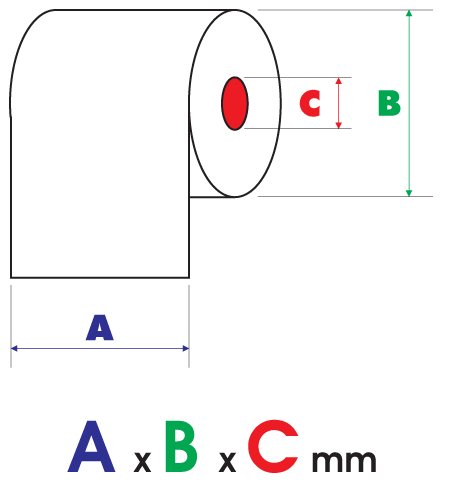
Diameter is what catches people out. Every common card roll is 57mm wide, so a wrong roll still drops in, it just will not close. A 57 x 40mm roll in a bay built for 57 x 30mm is the usual culprit. The sizes are compared in 57 x 40mm vs 57 x 30mm credit card rolls.
| Symptom | Likely cause | Fix |
|---|---|---|
| Receipt prints blank | Roll loaded upside down | Flip the roll so paper feeds from underneath |
| Flap will not click shut | Old core left in, or roll too large | Clear the bay, check the roll diameter |
| Paper feeds crooked or jams | Roll not sitting flat in the bay | Reseat the roll square, straighten the tail |
| Print is pale or patchy | Dusty head or heat-damaged paper | Wipe the head, use a fresh roll stored cool |
| Nothing feeds at all | Paper not thermal | Scratch test the paper, replace with thermal |
Which roll should you keep as a spare?
Keep whatever size your terminal was built around, and keep it where staff can reach it. For most countertop and handheld machines that is 57 x 40mm. For pocket-sized readers it is usually the shorter 57 x 30mm. Check the size printed on your last roll's box before you reorder a full box.
Every common card roll is 57mm wide with a 12.7mm core, so the only number you really need to confirm is the diameter. Brand by brand detail is in what rolls does my card terminal take, and if you run orders through a delivery platform see rolls for Just Eat, Deliveroo and Uber Eats terminals.

Never run out mid queue
Card machine rolls in every 57mm size, thermal, trade prices and fast Irish delivery from our Cavan warehouse.
Frequently asked questions
How do you put a roll in a card machine?
Open the printer flap on top of the terminal, lift out the old cardboard core, and drop the new roll in so the paper unwinds from underneath. Pull a short tail out over the front edge, then press the flap shut until it clicks. Tear off the tail and print a test receipt.
Which way up does a card machine roll go?
The paper must feed from underneath the roll and out towards the front, with the shiny coated side facing up as it leaves the bay. Thermal paper prints on one side only, so a roll sitting the wrong way round will feed normally but give you blank receipts.
Why is my card machine printing blank receipts?
The roll is almost certainly in upside down, so the print head is pressing on the uncoated back of the paper. Open the flap and turn the roll over so it unwinds from underneath. If it still prints blank, scratch the shiny side with a coin. No grey mark means the paper is not thermal.
Why will the printer flap on my card machine not close?
Three usual causes. The old cardboard core is still in the bay, the paper is bunched underneath the roll, or the roll is too large a diameter for that terminal. Take the roll out, clear the bay, and check the size on the box against what your terminal is designed for.
What size roll does a card machine take?
Almost all card machines take a 57mm wide thermal roll with a 12.7mm core. The everyday size is 57 x 40mm, which fits most countertop and handheld terminals. Smaller mobile and contactless readers often take the shorter 57 x 30mm. Check the size printed on your last roll's box.
Do you need to thread the paper into a card machine?
No. Card terminals use drop-in printers, so the roll simply sits in the bay with a short tail left sticking out over the front edge. Closing the flap grips the paper for you. If you are trying to feed paper into a slot, the lid is not fully open.