


Kitchen Printer Rolls: Impact vs Thermal Docket Printers

Kitchen printer rolls come in two types, and the printer decides which you need. Impact (dot-matrix) printers such as the Epson TM-U220 and Star SP700 take 76mm bond rolls, often 2-ply, plus an ink ribbon. Thermal docket printers take 80mm thermal rolls, the same paper as your till.
What are kitchen printer rolls?
Kitchen printer rolls are the paper rolls used by docket printers in a kitchen or bar, printing food orders sent through from the till. They come in two forms. Bond (plain) rolls for impact printers, usually 76mm wide and often 2-ply, and thermal rolls for thermal docket printers, usually 80mm wide.
The docket printer sits away from the counter, in the kitchen, at the pass or behind the bar. When a server rings an order into the till, the ticket prints where the food is made. That job matters more than it sounds. A docket that fades or smudges in the heat costs you a wrong order.
So the roll is not a free choice. Your printer already decided it. The rest of this guide shows you how to tell which one you have.
Do kitchen printers use thermal or bond rolls?
It depends on the printer. Impact (dot-matrix) kitchen printers, such as the Epson TM-U220 and Star SP700, use 76mm bond rolls plus an ink ribbon. Thermal docket printers use 80mm thermal rolls with no ribbon at all. Check whether your printer prints with a ribbon or with heat, then match the roll.
Two quick checks tell you which you have.
- Open the printer. If there is a small plastic cartridge sitting above the paper, that is an ink ribbon, and you have an impact printer. No cartridge means thermal.
- Listen to it during service. Impact printers are noisy, with a clear buzzing rattle as the pins strike. Thermal printers are near silent. If you can hear the docket printer over a working kitchen, it is almost certainly impact.
If the printer is already out of reach behind the pass, you can settle it from the paper alone instead. The test for that, and what each paper type actually is, is set out in bond rolls vs thermal rolls.
Impact vs thermal kitchen printers: how do they compare?
Impact printers strike an ink ribbon against plain paper, so the print survives heat, steam and grease. Thermal printers darken a coated roll with heat, so they are faster, quieter and cheaper to run, but the docket can fade near a grill or fryer. Choose on where the printer sits.
| In a kitchen | Impact (dot-matrix) | Thermal |
|---|---|---|
| Common models | Epson TM-U220, Star SP700 | Epson TM-T, Star TSP ranges |
| Roll it takes | 76mm bond, often 2-ply | 80mm thermal |
| What you reorder | Roll and ink ribbon | Roll only |
| Sited over a grill or fryer | Print holds up well | Docket can darken or fade |
| Copies per order | 2-ply gives the pass a second copy | Single copy only |
| Heard over a busy kitchen | Loud, which staff notice | Quiet, easy to miss |
| Speed per docket | Slower | Fast |
Impact printers look old-fashioned beside a modern thermal unit, and they are slower and louder. They stay in kitchens for one reason. A thermal docket pinned above a grill turns grey and unreadable. Bond paper and ink do not care about the heat.
What size roll does my kitchen printer take?
Impact kitchen printers take 76mm bond rolls, most commonly 76 x 70mm, on a standard core. Thermal docket printers take 80mm thermal, usually 80 x 80mm, the same roll as most tills and receipt printers. Confirm against the box your last rolls came in, or your printer's model number.
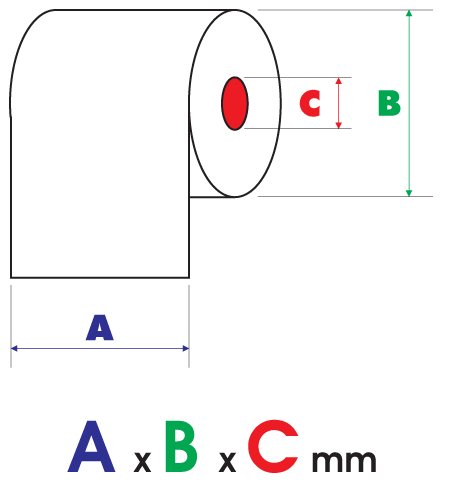
Roll sizes read as width by diameter by core, all in millimetres. Width and core have to match your printer. Diameter only sets how much paper is on the roll, so a bigger diameter simply lasts longer between changes.
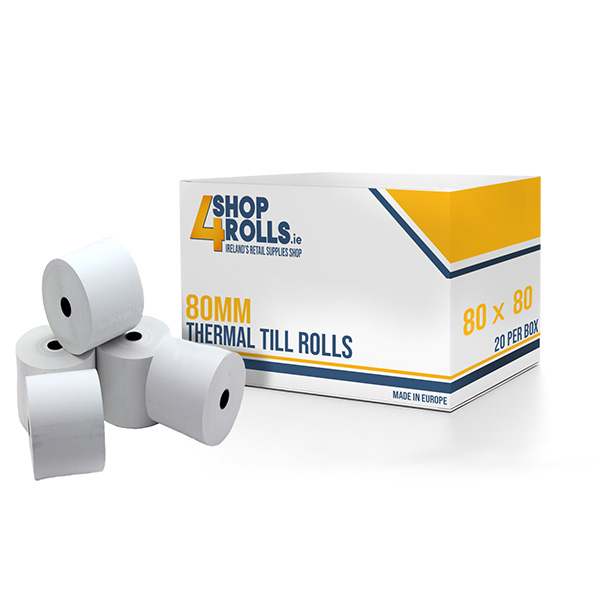
If you run thermal at the counter and thermal in the kitchen, you only stock one roll. That is a real saving in a small stockroom, and it stops a chef being handed the wrong box mid service. The till roll compatibility guide lists rolls by machine if you want the model-by-model detail for the counter printer too.
What is a 2-ply kitchen roll for?
A 2-ply kitchen roll prints two copies at once. The impact printer's pins press through both layers, so the top copy goes to the kitchen with the order and the second stays at the pass or the bar. It gives you a paper trail without printing the docket twice.
Only impact printers can print 2-ply. Thermal has no way to mark a second sheet, because the heat only reaches the coated top layer. If your kitchen relies on a duplicate docket, you need an impact printer and a 2-ply bond roll.
Kitchens that use the second copy well tend to run it like this.
- Top copy goes to the section cooking the dish.
- Second copy stays at the pass so the head chef can call the order and check the plate.
- The pass copy gets spiked once the food leaves, which shows what is still open.
Do I need an ink ribbon as well?
Yes, if your kitchen printer is an impact model. The roll is only half the order. Impact printers strike an ink ribbon to make the mark, and the print fades to grey as the ribbon dries out. Thermal docket printers need no ribbon at all, only the roll.
Ribbons are cheap and easy to forget until a chef complains they cannot read the docket. Order them with your rolls, not after. Which cartridge fits which printer, and how to change one, is set out in ink ribbons explained.
One habit worth keeping. When a docket starts printing faint, change the ribbon straight away rather than turning the print density up. A worn ribbon only gets worse, and a missed order costs more than a cartridge.
Order kitchen printer rolls and ribbons together
76mm bond, 2-ply and 80mm thermal docket rolls, plus the matching ink ribbons, at trade prices with fast Irish delivery from our Cavan warehouse.
What rolls do Toast and other EPOS kitchen printers take?
Newer hospitality systems like Toast pair a counter receipt printer with a kitchen printer, and both are usually standard machines under the branding. The kitchen unit is either an 80mm thermal docket printer or a 76mm impact printer, so the same two answers apply. Check the paper bay, or the roll size on the old box, before you order. There is more on those setups in receipt rolls for SumUp, Square and Toast printers, and you can pick up cartridges on the ink ribbons page.
Frequently asked questions
Do kitchen printers use thermal or bond rolls?
It depends on the printer. Impact (dot-matrix) kitchen printers, such as the Epson TM-U220 or Star SP700, use 76mm bond rolls, often 2-ply for a copy, plus an ink ribbon. Thermal docket printers use 80mm thermal rolls, the same as a till. Check whether yours prints with heat or a ribbon.
What size roll does a kitchen printer take?
Impact kitchen printers take 76mm bond rolls, most commonly 76 x 70mm. Thermal docket printers take 80mm thermal, usually 80 x 80mm, the same roll as most tills and receipt printers. Confirm the size on the box your last rolls came in, or check your printer's model number.
How do I tell if my kitchen printer is impact or thermal?
Open the printer and look for a small plastic ink cartridge above the paper. A cartridge means an impact printer, no cartridge means thermal. You can also scratch an old roll with a coin. A grey mark means thermal paper. Impact printers are noticeably louder in use.
Why do kitchens still use impact printers?
Impact printers strike an ink ribbon against plain paper, so the print survives heat, steam and grease from a grill or fryer. Thermal dockets can darken or fade in those conditions. Impact printers also print 2-ply rolls, which gives the kitchen and the pass a copy of the same order.
What is a 2-ply kitchen roll?
A 2-ply kitchen roll prints two copies at once. The impact printer's pins press through both layers, so the top copy goes to the kitchen with the order and the second stays at the pass or bar. Only impact printers can print 2-ply, as thermal heat cannot mark the lower layer.
Do I need an ink ribbon for my kitchen printer?
Only if it is an impact printer. Those print by striking an ink ribbon, so the ribbon is part of every order alongside the bond rolls. The Epson ERC family covers models like the TM-U220, and the Star RC700 suits the SP700. Thermal docket printers need no ribbon at all.